
I built a hands-on course to make CORS finally click
I've been building this in the background for a while, and it feels a bit surreal to finally say it out loud.


I’ve been building this in the background for a while, and it feels a bit surreal to finally say it out loud:
I-Hate-CORS is live. (i-hate-cors.com)
It’s a hands-on course for developers who are tired of losing afternoons to CORS errors.
If you’ve ever had one of these days:
- The UI works locally, you deploy, and suddenly every request is blocked
- The same API call succeeds in Postman but fails in the browser
- You add a header you don’t fully understand because it’s the only thing that makes the red error go away
- A third-party widget works on one page and breaks on another, and you can’t explain why
…you’re the person I had in mind while building this.
Why this exists
I’m a security engineer. I work with browser security for a living. And over the years, I’ve watched a pattern play out over and over again:
- A developer hits a CORS error
- They try a handful of header combinations
- They land on something that “works”
- They quietly ship a configuration they don’t fully understand
I don’t say that judgmentally - it’s the predictable outcome of how CORS is taught. Most tutorials jump straight to headers and preflights. That helps you fix one situation. It doesn’t give you the mental model that makes the next situation easier.
CORS is genuinely complex. The browser security model evolved over decades as a patchwork of fixes and additions. Same-Origin Policy came first, then CORS was bolted on top to create controlled exceptions. The result is multiple moving parts, vague error messages, and behavior that changes between environments.
So I built the course I always wished existed: one that teaches you how the browser actually thinks about requests, origins, and who is allowed to read what.
Once you have that, CORS stops being mysterious.
The part I’m most proud of: the labs
This is where the platform earns its keep, and where I spent most of my time.
Every lab spins up an isolated environment just for you. Your own frontend. Your own backend API, configured with specific CORS behavior. No Docker. No local setup. No dependencies. Everything runs in your browser.
Here’s what the lab experience looks like:
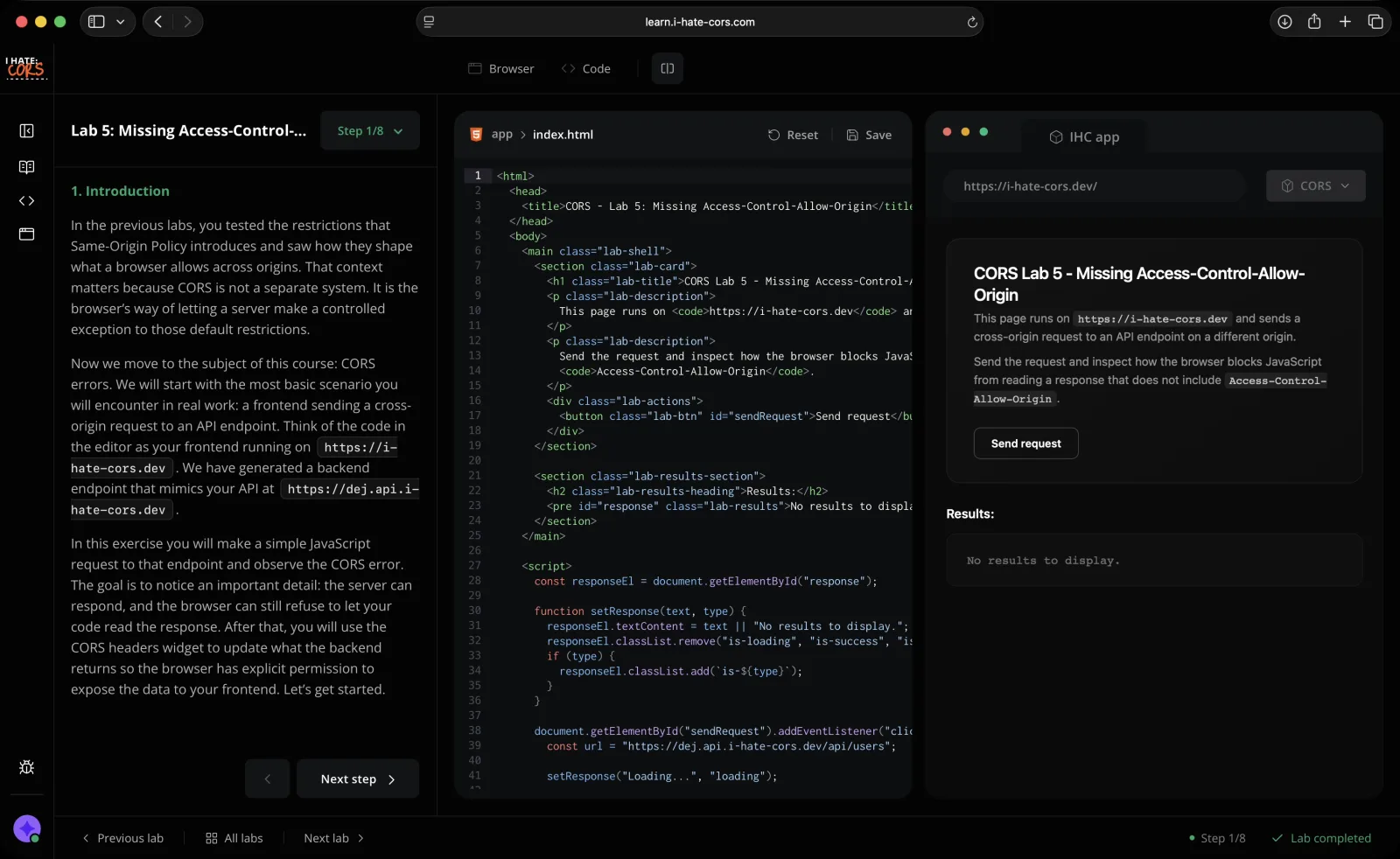
On the left, step-by-step instructions walk you through the scenario. In the middle, a code editor shows the frontend code making the cross-origin request. On the right, a live browser preview renders that code - complete with the cross-origin restrictions that make CORS painful in the first place.
You edit the code, run it, and watch the browser react. Then you do it again with different headers and different configurations until the behavior clicks.
But the thing I’m most excited about is a small detail that changes everything: a built-in widget that lets you modify the backend’s CORS headers in real-time.
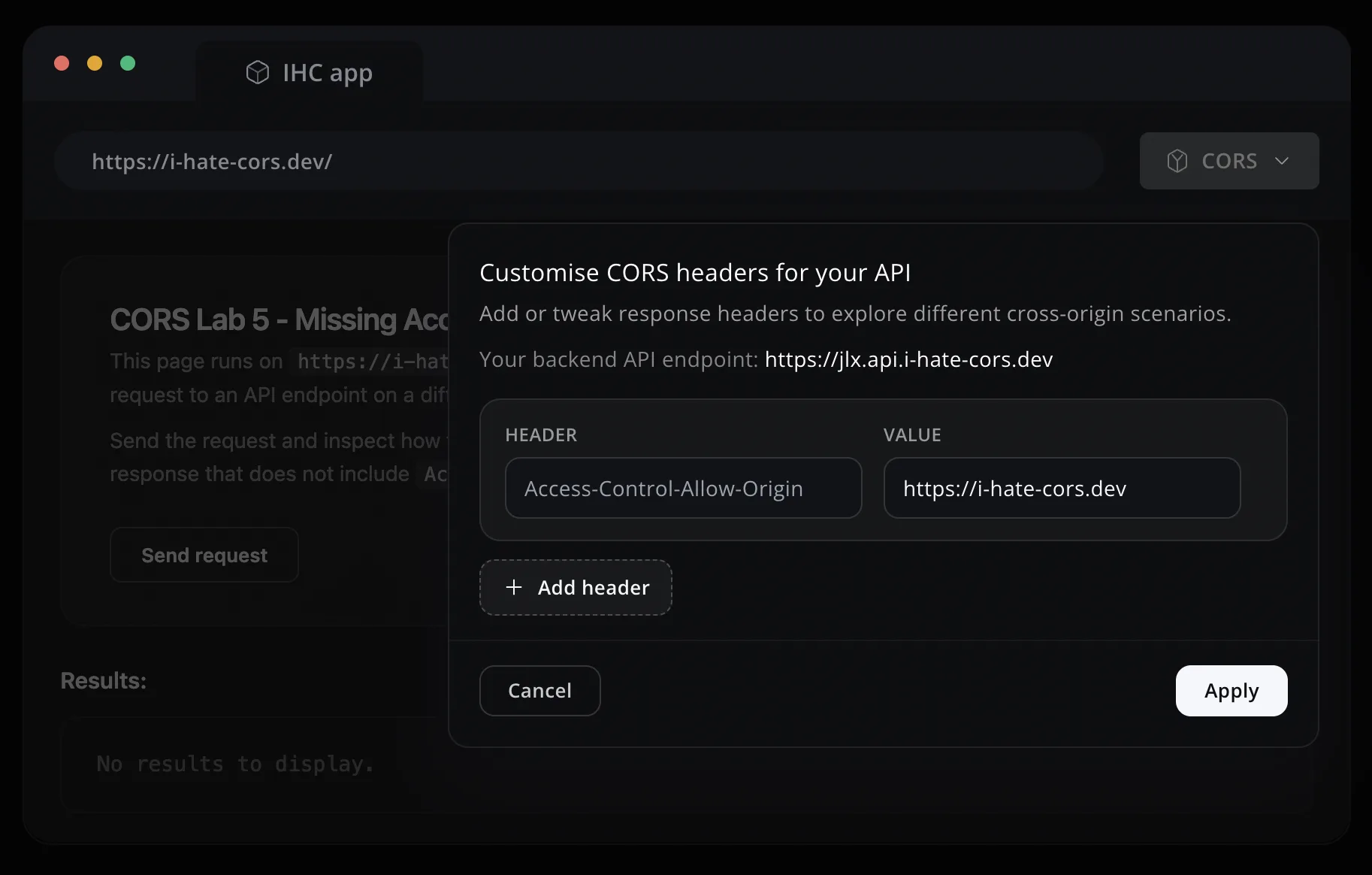
That means you don’t just read about what Access-Control-Allow-Origin does. You toggle it on, toggle it off, set it to the wrong value, and watch the browser respond each time. You stop guessing. You test a hypothesis in seconds.
You can try it yourself - the demo lab is open to everyone:
Try the demo lab -> (You’ll need a desktop for the code editor)
What the course covers
The course starts where most CORS tutorials don’t: the browser’s security model. Not because I want to be academic, but because CORS makes so much more sense when you understand why the browser is making your life hard. It’s a short, approachable introduction - just enough to make everything that follows feel logical instead of arbitrary.
From there, it builds up through Same-Origin Policy and into CORS itself. 8 lessons and 12 labs covering things like:
- Why some requests trigger preflights and others don’t
- What
no-corsmode actually does (and why the name is so misleading) - Why credentials and cookies change the rules in ways that surprise people
- The subtle differences between local dev and production that make bugs appear “out of nowhere”
- Configuring CORS correctly on real deployments - AWS, Vercel, Netlify - without copying random header snippets
Each concept is explained in depth, then reinforced with a lab where you can break things and fix them yourself.
Who it’s for
Frontend, full-stack, backend - anyone who ships web software and keeps bumping into cross-origin behavior.
If you’ve ever found yourself saying “I don’t really understand CORS, I just know the incantation that fixes it,” that’s the gap I’m trying to close.
What you’ll walk away with
When you see a CORS error after this course, you won’t “try stuff.” You’ll open DevTools and know exactly what to look for:
- Was it a simple request or a preflighted one?
- Did the preflight fail or did the actual request fail?
- Does the server’s
Access-Control-Allow-Originmatch the origin exactly? - Are credentials involved?
- Are you relying on behavior your local proxy gives you that production won’t?
Those questions sound small, but they’re the difference between 3 minutes and 3 hours.
Try it
The course isn’t the kind of thing that’s easy to sell with words. The value is in the loop: read, try, break, fix, understand.
So rather than writing another paragraph about it - just try the demo lab and see if it clicks:
And if you want the full course, you can grab it here: i-hate-cors.com
Thanks for reading. I hope it saves you a ridiculous amount of time.